 Michael Peters
1. Browser DevTools aren't made for modern Web Frameworks
In web development technologies are rapidly changing. We use frameworks like TailwindCSS, React.js and many more. But the DevTools are not keeping up with these changes, and they likely won't. As they are dedicated to work with mostly plain HTML, CSS and JavaScript.
The result is something like in this image below where it takes half the dev tools window to show 7 utility classes.
For those who are unfamiliar with the problems you face: Tailwinds classes fill up the window where you usually see the properties you add to a class. In a place where you could easily change and view the properties of a specific component you now see many utility classes that take up the whole space. Changes are not quick anymore as you probably need to click on the plus button at the top to add a rule that only applies to the element (type) you selected instead to all elements that use top-0 for example. In the case that you prefer changing the utility classes in the html elements tab there is a big chance that after a couple of changes you'll get lost trying to figure out what the changes where that you did.
The result is something like in this image below where it takes half the dev tools window to show 7 utility classes.
For those who are unfamiliar with the problems you face: Tailwinds classes fill up the window where you usually see the properties you add to a class. In a place where you could easily change and view the properties of a specific component you now see many utility classes that take up the whole space. Changes are not quick anymore as you probably need to click on the plus button at the top to add a rule that only applies to the element (type) you selected instead to all elements that use top-0 for example. In the case that you prefer changing the utility classes in the html elements tab there is a big chance that after a couple of changes you'll get lost trying to figure out what the changes where that you did.
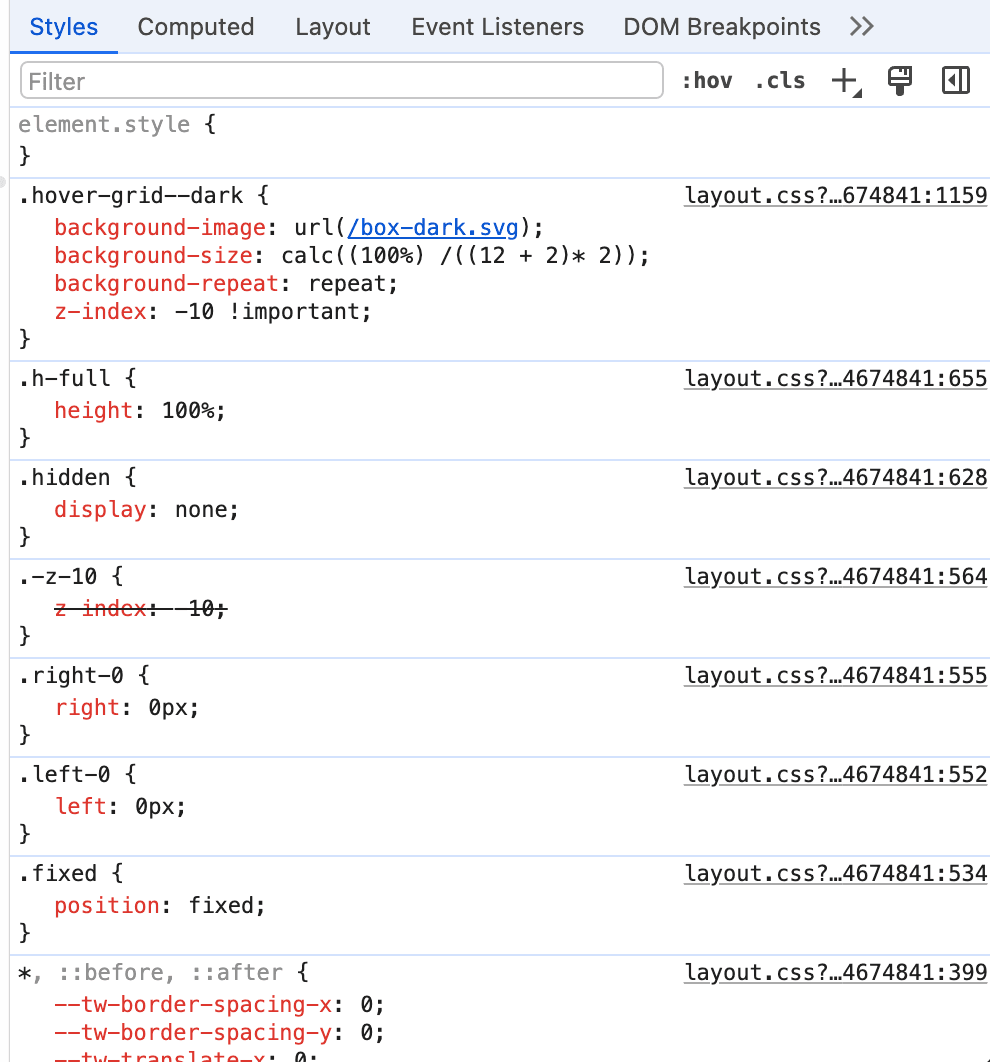
I believe that the DevTools could use some optimization specifically for TailwindCSS. Currently it takes 3 entire lines to show the information for a single utility class. If you ask me that's way too much, it probably would've been more helpful if they just listed the utility class names and put a link to the Tailwind documentation there.
2. How can we improve?
To figure out what the better information structure could be. Let's summarize what the DevTools are showed us in the screenshot above:
In addition to that we probably also triggered the website to resize because the DevTools needed some space. Ideas on how to improve:
- There are 7 utility classes being used on the element.
- Every utility class is shown with it's CSS properties.
- z-Index is being overridden by
hover-grid--dark
- I had to open the DevTools. On MacOS I used
Cmd+Shift+I - Then I clicked on the "Select Element Tool" and selected an element.
In addition to that we probably also triggered the website to resize because the DevTools needed some space. Ideas on how to improve:
- Don't trigger a resize
- Show utility classes when hovering over an element and pressing "option" (MacOS) or "alt" (Windows)
3. Bridging the Gap
How can we bridge the gap between modern web technologies and the DevTools? Having a better integration with the DevTools would be a good start.
Here are some ideas on how to improve the DevTools:
Here are some ideas on how to improve the DevTools:
- Make the DevTools Styles Panel more TailwindCSS friendly.
- Allow developers to add custom utility classes quicker.
- Reduce the steps per change.